
Use this report to understand the breadth and structure of the True 360 data feed, preview how shopper attributes are organized, and evaluate how the data could support personalization, customer intelligence, marketing, and merchandising use cases.
How to access this dashboard
The True 360 Sample View is available under the “Reports” section of the Connect portal. Click “Reports > True 360 Sample View”.
Who should use this report?
This report is designed for teams responsible for:
- Customer Data and Analytics
- Ecommerce
- Personalization
- Marketing and CRM
- Merchandising
- Product Development
- Customer Experience
- Data Engineering and Technology
When to use this report
Use this report to:
- Preview the shopper-level fields available through True 360.
- Understand how registration, demographic, and body-profile data are structured.
- Explore shopper brand affinities and likely sizes across brands and categories.
- Evaluate potential personalization, segmentation, and customer-intelligence use cases.
- Confirm feed format, refresh cadence, and available fields before implementation.
- Share a representative view of True 360 data with business and technical stakeholders.
How this report works
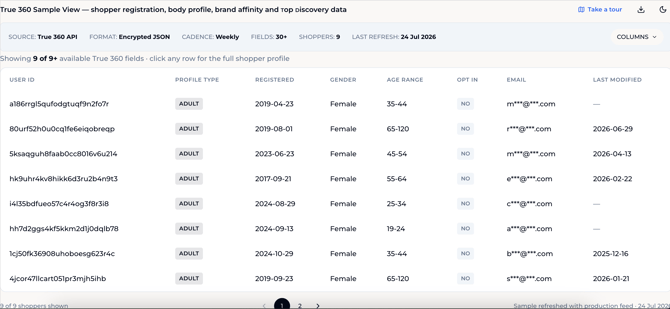
The True 360 Sample View presents a sample of shopper records available through the True 360 API.
Each row represents one shopper profile and includes a set of core fields, such as profile type, registration date, gender, age range, consent status, and masked email. Optional fields can be added to the table to explore additional data, including body measurements, store user IDs, brand affinities, and likely sizes.
Some fields contain multiple values. These appear as expandable cells that open an inline detail card within the shopper row.
The report is intended to demonstrate the structure and richness of the True 360 feed. It is a sample view rather than a complete customer analytics dashboard, and the shoppers displayed may represent only a subset of the retailer’s full available feed.
Understanding the Report
1 - Feed Metadata
The metadata bar provides a quick overview of the sample feed.
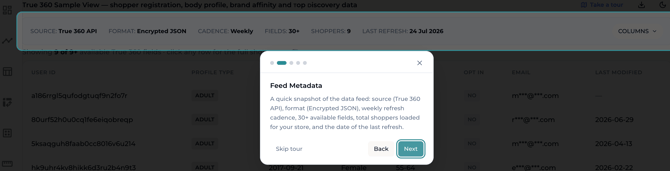
| Field | Description |
|---|---|
| Source | The system providing the data. In this report, the source is the True 360 API. |
| Format | The format used to deliver the feed. |
| Cadence | How frequently the data is refreshed or delivered. |
| Fields | The number of fields available in the full feed. |
| Shoppers | The number of shopper records included in the current sample. |
| Last Refresh | The most recent date the sample was refreshed from the production feed. |
Use this section to confirm the structure and freshness of the sample before reviewing individual shopper records.
NOTE: The number of shoppers shown in the Sample View may be smaller than the total shopper population available through the production feed.
2 - Shopper Table
Each row in the table represents one shopper profile.
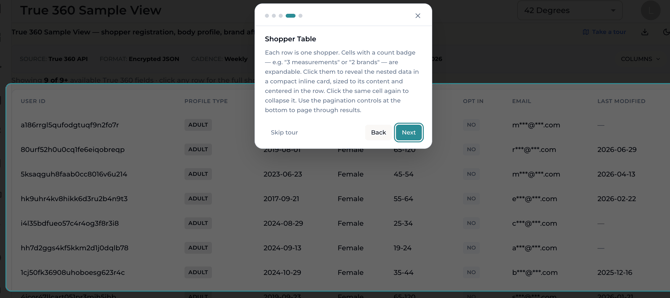
Core fields remain visible by default and may include:
| Field | Description |
|---|---|
| User ID | The stable True 360 identifier associated with the shopper profile. |
| Profile Type | Identifies whether the profile represents an Adult, Kid, or another supported profile type. |
| Registered | The date the shopper created or registered the profile. |
| Gender | The gender recorded in the shopper profile, when available. |
| Age Range | The shopper’s age band rather than an exact age. |
| Opt In | Indicates the shopper’s applicable consent or marketing opt-in status. |
| A masked version of the shopper’s email address. | |
| Last Modified | The date the profile was most recently updated, when available. |
A dash indicates that a value is not available for that shopper.
3 - Pagination
Use the controls beneath the table to move between pages of shopper records.
The shopper count below the table indicates how many profiles are currently displayed within the sample.
Selecting Optional Fields
Select Columns to add or remove optional fields from the shopper table.
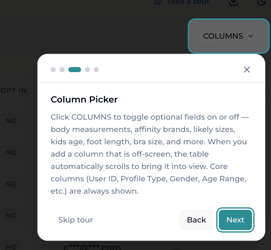
Available options may include:
- Parent User ID
- Originated Here
- Registration Locale
- Body Measurements
- Store User IDs
- Affinity Brands
- Likely Sizes
Core fields, such as User ID, Profile Type, Gender, and Age Range, remain visible.
When an optional field is selected:
- A new column is added to the table.
- The table may automatically scroll horizontally to bring that column into view.
- The field will be included in the export while it remains selected.
Use the column picker to tailor the table to the business question you are exploring rather than displaying every available field at once.
Exploring Expandable Fields
Some optional columns contain multiple values for each shopper.
These cells display a count, such as:
- 6 measurements
- 2 brands
- 50 items
Select the count to open an inline card containing the underlying values. Select it again to collapse the card.
Body Measurements
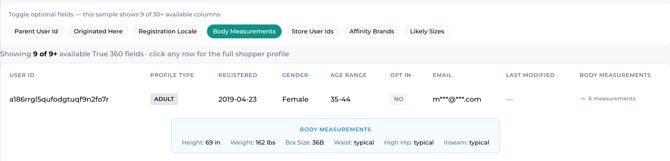
The Body Measurements field may include shopper-provided or derived body and fit attributes, such as:
- Height
- Weight
- Bra size
- Waist profile
- Hip profile
- Inseam
- Body shape
- Build
- Additional fit-preference or measurement attributes
The number and type of measurements available may vary by shopper.
Use the Imperial and Metric toggle to switch the displayed measurement units when Body Measurements is selected.
Affinity Brands
The Affinity Brands field shows ranked brand affinities associated with the shopper.
These signals can help teams understand:
- Which brands the shopper is most closely associated with.
- Which brands may be familiar reference points.
- Where cross-brand merchandising or personalization opportunities may exist.
Brand affinity should be interpreted as a modeled or behavioral signal, not as a complete list of every brand the shopper owns or prefers.
Likely Sizes
The Likely Sizes field shows predicted sizes for the shopper across brands, departments, categories, and locales.
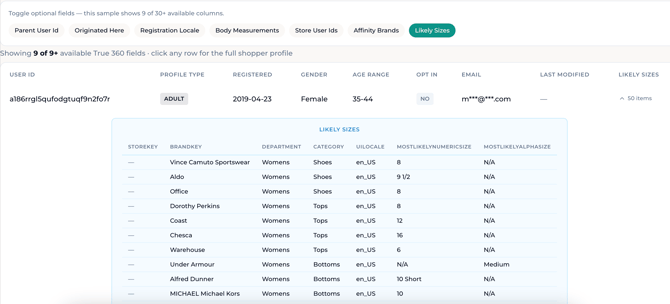
Depending on the product type, the table may include:
- Brand
- Department
- Category
- Locale
- Most likely numeric size
- Most likely alpha size
A shopper may have many likely-size entries because sizing can differ by brand and product category.
Use this field to understand how True Fit translates a shopper’s profile and fit history across the broader apparel and footwear ecosystem.
Store User IDs
Store User IDs can help connect the True 360 profile with the retailer’s own customer identifiers, where available and permitted.
This can support approved integration workflows across customer-data, analytics, personalization, or CRM systems.
Parent User ID and Profile Type
Parent User ID and Profile Type help distinguish individual and linked profiles.
For example, an adult profile may be associated with one or more child profiles. This can support household or multi-profile shopping experiences when included in the retailer’s True 360 implementation.
Registration Locale and Originated Here
Registration Locale indicates the locale associated with profile creation.
Originated Here indicates whether the shopper profile originated with the current retailer or entered the True Fit ecosystem through another supported experience.
These fields can help teams understand profile provenance and geographic context.
Downloading the Sample
Select the download icon to export the currently visible data as a JSON Lines file.
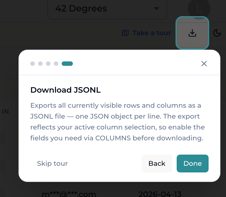
The export includes:
- The currently visible shopper rows.
- The currently selected columns.
- One JSON object per line.
Before downloading, use Columns to enable every optional field you need.
NOTE: Optional fields that are not selected in the table will not be included in the export.
JSON Lines is designed for technical workflows and can be useful for:
- Reviewing the sample structure with data engineering teams.
- Testing parsing and ingestion logic.
- Evaluating field mappings.
- Sharing representative records with approved technical stakeholders.
What’s Included in the Full Feed
The full True 360 feed is organized into three broad groups of shopper intelligence.
Registration & Demographics
The identity and profile layer may include:
- Stable User ID
- Registration date
- Registration locale
- Gender
- Age range
- Profile type
- Linked-profile information
- Store-specific identifiers
- Applicable consent fields
These fields help connect and organize shopper profiles across approved customer-data workflows.
Body Profile
The body-profile layer may include more than 20 available body-measurement and fit-preference fields.
Depending on the shopper, these may include:
- Height
- Weight
- Body shape
- Build
- Bra size
- Waist
- Hip profile
- Inseam
- Foot measurements
- Additional fit attributes
Not every shopper will have every body-profile field populated.
Affinity & Discovery
The affinity and discovery layer may include:
- Ranked brand affinities
- Likely sizes across brands and categories
- Predicted category interests
- Top discovery recommendations
- Department- and category-level shopper signals
These fields are refreshed to reflect the latest available shopper behavior and intelligence.
Accessing the Full Feed
The True 360 feed is made available via secure API endpoints or provided as an encrypted JSON file.
1. Metadata API - The Metadata API returns high-level information regarding the current True 360 data file on the server.
2. Content API - The Content API returns the current True 360 file from the server. The data file is a newline-delimited JSON file.
Please email support@truefit.com to access the full True 360 feed.
Accessing the Full Feed - Shopify
Retailers using True Fit's Shopify application can find some of the True 360 data in the Customer Profile Segment in Shopify. Please email support@Truefit.com to access the full True 360 feed.
Business Applications
| Team | Questions this report can help answer |
|---|---|
| Customer Data & Analytics | Which True 360 fields can enrich our existing customer profile? How can stable identifiers and store user IDs support approved profile matching? |
| Personalization | Can we personalize content, products, or fit experiences using body profile, brand affinity, category interest, or likely-size data? |
| Marketing & CRM | Can shopper interests and affinities support more relevant audience segmentation or messaging? Which attributes are appropriate for our approved activation use cases? |
| Ecommerce | How can likely sizes, body profile, and brand familiarity reduce friction as shoppers browse unfamiliar products or brands? |
| Merchandising | Which brands and categories appear most relevant to individual shoppers? Can those signals support product ranking, recommendations, or assortment discovery? |
| Customer Experience | Can linked profiles and shopper-specific fit data support household shopping or more personalized service? |
| Data Engineering & Technology |
What is the feed format, refresh cadence, field structure, and expected nesting? Which fields need to be mapped into internal systems? |
Best Practices
To get the most value from this report:
- Begin by reviewing the feed metadata before inspecting individual records.
- Use the column picker to focus on one business use case at a time.
- Expand multi-value fields to understand their structure before downloading the sample.
- Select every required optional column before exporting.
- Review several shopper records rather than relying on one profile as representative of the full population.
- Confirm how each field will be used, stored, and governed before integrating it into internal systems.
- Partner with data, privacy, legal, security, and business stakeholders when defining activation use cases.
- Treat predicted fields, such as affinities and likely sizes, as model-driven signals rather than fixed facts about the shopper.
Limitations
- The Sample View displays a limited number of representative shopper records rather than the complete production feed.
- The number and completeness of available fields vary by shopper.
- Not every shopper will have body measurements, brand affinities, likely sizes, or a recently modified profile.
- Predicted interests, affinities, and likely sizes may change as new shopper information becomes available.
- A missing value does not necessarily mean the field is unavailable in the full schema; it may not be populated for that shopper.
- Masked information in the Sample View may be represented differently in the approved production delivery.
- The report is intended to preview data structure and content. It is not designed for aggregate performance analysis or population-level conclusions.
- Access, use, retention, and activation of shopper-level data should follow the retailer’s approved privacy, consent, security, and data-governance requirements.
Frequently Asked Questions
-
Is this the retailer’s full True 360 feed?
-
No. This report provides a sample of shopper records and available fields. The production feed may include a larger shopper population and additional configured fields.
-
-
Does each row represent one shopper?
-
Yes. Each row represents one True 360 shopper profile.
-
-
Why do some shoppers have more fields than others?
-
Field availability depends on the information associated with each profile. Some shoppers have provided or generated more body-profile, affinity, or sizing data than others.
-
-
What does 30+ fields mean?
-
It indicates that more than 30 True 360 fields may be available in the full feed. The Sample View displays core fields and allows selected optional fields to be added to the table.
-
-
Why does the table say that it is showing fewer columns than are available?
-
The table shows only core fields and the optional fields currently enabled through the Columns menu.
-
-
How do I view body measurements or likely sizes?
-
Open Columns, enable the relevant field, and then select the count displayed in the shopper’s row to expand the underlying data.
-
-
Why does Likely Sizes contain multiple entries for one shopper?
-
A shopper may have a different predicted size by brand, department, category, sizing system, and locale.
-
-
Are affinity brands brands the shopper has purchased?
-
Not necessarily. Affinity is a ranked signal based on available True Fit intelligence and should not be treated as a complete purchase history.
-
-
What is Top Discovery?
-
Top Discovery refers to predicted category or product-interest signals intended to help identify what the shopper may be most interested in exploring. The exact fields included depend on the configured feed.
-
-
What does Opt In mean?
-
Opt In reflects the applicable consent or marketing-permission status delivered for the profile. Teams should confirm the exact field definition and permitted use with their True Fit and privacy stakeholders before activation.
-
-
Why are email addresses masked?
-
The Sample View limits the display of direct contact information. Production handling depends on the approved feed configuration, permissions, and data-governance requirements.
-
-
What is Last Modified?
-
Last Modified indicates the most recent recorded update to the shopper profile, when available.
-
-
How frequently is the data updated?
-
The metadata bar shows the configured cadence and the date of the most recent sample refresh. In the example shown, the cadence is weekly.
-
-
What does Encrypted JSON mean?
-
It describes the configured production-delivery format shown in the sample metadata. Technical teams should refer to their implementation documentation for the exact encryption, transfer, and processing workflow.
-
-
What does the download include?
-
The JSON Lines export includes the shopper rows and columns currently visible in the Sample View. Enable optional fields through Columns before exporting them.
-
-
Can I export the data as CSV?
-
The current Sample View shows a JSON Lines export. Availability of other formats should be confirmed with your True Fit team.
-
-
Can I use this report to analyze my overall shopper population?
-
The Sample View is designed to demonstrate individual records and feed structure. Use aggregate reporting, such as Shopper Demographics, for population-level analysis.
-